REVIEW · ISTANBUL
Pocket Wifi Turkey- Unlimited
Book on Viator →Operated by Pocket Wifi Turkey - Fastest mobile wifi service in Turkey · Bookable on Viator
A pocket router beats roaming stress. In Istanbul, Pocket WiFi Turkey – Unlimited gives you a personal WiFi zone using a SIM card, activated for you through Turkcell’s official agent at the airport. It’s one of the simplest ways to avoid guessing which WiFi network will work when you need it most.
I especially like that the SIM registration and activation are handled on your behalf. You also get something practical in hand: a small device that fits in your pocket, and you can share the connection with other people traveling with you.
The trade-off is real: you have to provide your passport and sign a subscription agreement for the registration process. And while the service can work great, one review did report signal problems later in the trip, so you’ll want to know who to contact if anything goes wrong.
In This Review
- Key highlights worth knowing
- Getting your Turkcell SIM set up at Istanbul Airport
- What you actually get: a pocket WiFi router, not a mystery app
- Using Pocket WiFi day to day in Istanbul and beyond
- The price: does $60.47 make sense for your trip length?
- Istanbul pickup details: where, when, and how to be ready
- When things go wrong: signal issues and real support
- Best fit: who should book Pocket WiFi Unlimited?
- Final call: should you book this Pocket WiFi rental?
- FAQ
- Do I need a passport to get the Pocket WiFi?
- How does the Pocket WiFi connect to the internet?
- Is the data unlimited?
- How long can I rent the Pocket WiFi?
- Where do I pick up the device in Istanbul?
- If I have signal problems, how do I get help?
Key highlights worth knowing
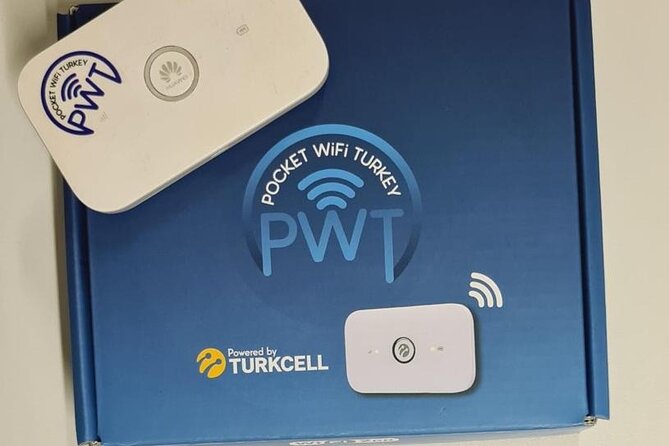
- Turkcell SIM setup through an official agent at Istanbul Airport, not a DIY scramble
- Passport + subscription agreement required for registration
- A personal WiFi zone you can share with other devices and people
- Works across your Turkey stay for as short as 1 day up to about 30
- 24/7 support is available if you run into trouble (phone number is on the box)
Getting your Turkcell SIM set up at Istanbul Airport
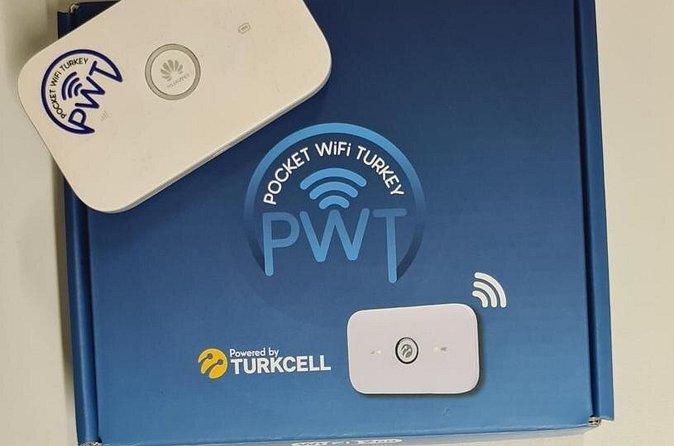
This is a pocket-sized internet setup, but it starts with one very grounded, no-nonsense step: getting your SIM registered. The service is operated as Turkcell’s official agent, which matters because activation isn’t just “plug it in and hope.” Someone handles the SIM registration process for you, then activates your device with the data plan.
You’ll do this at Istanbul Airport at the listed meeting point. The pickup location is Tayakadın, Terminal Caddesi No:1, 34283 Arnavutköy/İstanbul, Türkiye. Since the activity ends back at the meeting point, think of this as an airport start-and-finish service, not something you schedule around neighborhood landmarks.
Plan to have your passport ready. You must provide it to the employee for the registration, and you’ll sign a subscription agreement as part of setting up the Turkcell SIM. If you’re the type who hates paperwork, this won’t feel like your favorite travel moment. But if you want your connection working quickly after arrival, it’s the kind of setup that front-loads the hassle so you don’t suffer later.
You can also read our reviews of more tours and experiences in Istanbul.



What you actually get: a pocket WiFi router, not a mystery app
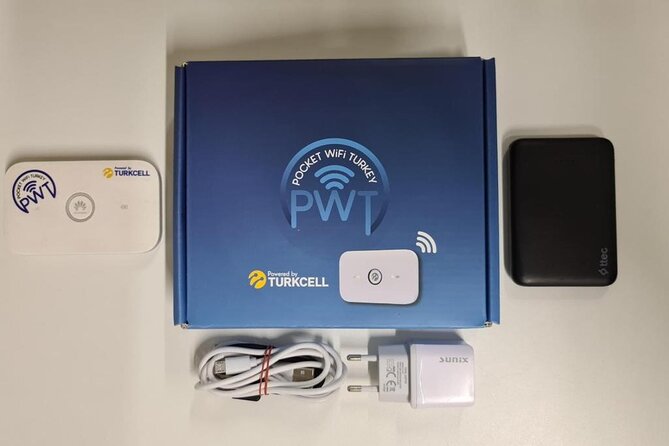
Pocket WiFi here means a mobile wireless router you carry with you—small enough to fit in your pocket. The router creates a personal WiFi zone, which is the simplest way to keep multiple devices online without relying on public WiFi.
The device works with a SIM card, and in this case the SIM is registered and activated for you. That’s the core point: you’re not buying a card and trying to match the right settings on the fly. You pick up the device, it gets activated, and then you use it as your Turkey internet hub.
One useful feature for real-world travel: you can share the internet. The device creates a personal connection that you can share with other people. So if you’re traveling with a partner, a friend, or a small group, you’re not stuck dividing time between who gets signal and who waits.
Using Pocket WiFi day to day in Istanbul and beyond
Once you’re set up, the whole value is that you stay connected during your stay in Turkey. The service is designed for exactly that moment when you need a reliable link—checking messages, handling questions, or just keeping your day moving.
A review included a specific example of how internet matters on a trip: the renter said the device worked well for the first few days, then lost signal. They couldn’t reach anyone by phone or WhatsApp to ask about the status. That complaint is a reminder of what you’re really buying: not just data, but peace of mind that you can communicate if something changes.
To make the most of the “personal WiFi zone” idea, I’d treat the pocket router like an essential travel item, similar to a charger. Keep it charged and protect it like you would your passport wallet. If you’re depending on it for communication, you don’t want a low-battery surprise to turn into an awkward delay.
Also, because the service is a shared connection, you can keep multiple devices online at once. That’s especially helpful when different people need the internet for their own tasks. When one person is checking messages and another is trying to handle travel logistics, a shared hotspot can save you from constant phone switching.
The price: does $60.47 make sense for your trip length?
The listed price is $60.47 per group (up to 1), and the rental duration runs from 1 to 30 days (approx.) depending on what you book. That “up to 30 days” range is important. It suggests the plan is meant for longer stays, and the longer you keep the router, the less you feel the cost each day.
Because the exact per-day math isn’t shown here, I’ll frame it this way: if you’re in Turkey for a week or more, you’re often paying for convenience and reliability more than the raw data. Unlimited WiFi on your own device means you’re not hunting for workable networks each time you need access.
This can be especially valuable if:
- you want to keep communication consistent across your whole trip
- you’re traveling with at least one other person who needs access too
- you’d rather pay once than keep upgrading or swapping SIMs
If your trip is only a day or two, you might decide you’re okay with limited connectivity. But once you’re spending multiple days in transit, hotels, and city walking routes, this kind of pocket hotspot can start to feel like one less thing to manage.
Istanbul pickup details: where, when, and how to be ready
This service is built around airport pickup. The meeting point is at Istanbul Airport (Tayakadın, Terminal Caddesi No:1, 34283 Arnavutköy/İstanbul). The start time listed is 12:00 am, and the ticket redemption point is also listed as Istanbul, Türkiye. Since airport timing can be unpredictable, the practical move is to double-check your booking confirmation for the exact pickup moment tied to your reservation.
The biggest “how to be ready” checklist is simple and specific:
- bring your passport (you must provide it for registration)
- expect to sign a subscription agreement
- keep the device’s box details so you know how to reach support later
The end of the activity is back at the meeting point. That means you should plan to return the device at the airport rather than tossing it into your day’s luggage-and-go rhythm. Treat that as a final admin task before departure.






When things go wrong: signal issues and real support
Not every rental goes perfectly. One review rated the service 3 out of 5 after renting for 7 days. The renter said it worked great for the first few days, then no signal appeared. More importantly, they couldn’t reach anyone via phone or WhatsApp to ask about the status.
A response from the provider directly addressed that concern. They said they tried to reach the renter after noticing the problem, and that the phone number is on the box, with support available 24/7. They also offered to help and serve the renter anytime.
Here’s how I’d translate that into a practical strategy for you:
- Keep the box packaging (or at least the phone number on it). Don’t bin it on day one.
- If signal drops, don’t wait quietly. Use the number on the box and contact support early.
- If you rely on the WiFi for communication, keep expectations realistic: signal can change, but you should have a direct support channel.
This is the most balanced way to judge the experience. The same service that can work smoothly for days can still have hiccups. The difference is how quickly you can get help when you notice a problem.
Best fit: who should book Pocket WiFi Unlimited?
This is a strong fit if your travel style depends on staying connected and you don’t want to gamble with public WiFi. I’d recommend it to you if:
- you want a simple, airport-based setup rather than figuring out SIM activation yourself
- you’re okay handing over your passport briefly for registration
- you’re traveling with at least one person who also needs online access
- you prefer one shared solution instead of multiple device plans
It may be less attractive if your trip is extremely short and you’d rather manage connectivity through hotel WiFi. It might also feel annoying if you dislike paperwork or aren’t comfortable with the passport and signature step required for Turkcell SIM registration.
The experience notes say most travelers can participate, which is useful if you’re wondering whether it’s a complicated activity. But the “most travelers” phrasing doesn’t tell you everything about your specific needs, so plan based on your own comfort with the passport registration process.
Final call: should you book this Pocket WiFi rental?
I’d book Pocket WiFi Turkey – Unlimited if your priority is dependable internet access without the hassle of SIM shopping and setup on the ground. The official-agent SIM registration is a big deal, because it reduces the odds of you leaving the airport with a device that isn’t actually activated yet.
But I’d also go in with one clear mindset: keep the phone number on the box and treat it like an essential contact. One review mentioned signal loss late in the rental and difficulty reaching help, while the provider response stressed 24/7 support. That contrast tells me the service can be good, yet it’s smart to be prepared to troubleshoot fast.
If you can handle passport paperwork at pickup, want a portable hotspot, and plan to use it for at least several days, this is usually a sensible value. If you’re only in Turkey briefly or you don’t want to deal with registration at all, you may prefer a different connectivity plan.
FAQ
Do I need a passport to get the Pocket WiFi?
Yes. You have to provide your passport to the employee for the Turkcell SIM registration, and you’ll sign a subscription agreement as part of the process.
How does the Pocket WiFi connect to the internet?
The pocket router works with a SIM card. Pocket WiFi creates a personal WiFi zone, and it’s activated after your SIM registration is handled through Turkcell’s official agent.
Is the data unlimited?
The service is listed as Pocket Wifi Turkey – Unlimited, so unlimited data is the intention of the plan you book.
How long can I rent the Pocket WiFi?
The duration is listed as 1 to 30 days (approx.), depending on your booking.
Where do I pick up the device in Istanbul?
Pickup is at Istanbul Airport (Tayakadın, Terminal Caddesi No:1, 34283 Arnavutköy/İstanbul, Türkiye). The activity ends back at the meeting point.
If I have signal problems, how do I get help?
The provider response notes that the phone number is on the box and that help is available 24/7. If signal changes or you lose connection, contact them using that number.